
When a customer pays for a new roof or closes on a house, you can thank them by mail with a card somebody writes by hand or with a printed postcard. MailStream now writes cards as well: a robotic arm holding a ballpoint pen writes your message inside a card from its catalogue and addresses the envelope, and the card is mailed First Class. MailStream prints and mails postcards and letters from a list, an API or an AI agent, and the cards come from the same account. The card is for the customer you expect to hire you again or to send you a referral. This post covers handwritten thank you cards: when to send a card and when a postcard, what fits in 500 characters, and how to send cards from a CSV.
Choosing between a card and a postcard
The catalogue has 805 designs for 28 occasions, among them thank-yous, customer appreciation, birthdays, work anniversaries, congratulations, closings, donor thank-yous and holidays, and the use cases it lists are a first order, a finished job, a donation and a customer who has not come back. Each card is addressed to one person by name. You can send one card from the dashboard or hundreds from a CSV at the same price, with no minimum order. A card costs more per piece than any postcard size on both plans, and the pricing page shows the two in the same table, so count how many people you are thanking before you choose. The plans are Free, with no monthly fee, and Pro, with a monthly fee and lower per-piece rates, and both pay per piece from Print Points, a prepaid balance where one point is one dollar.
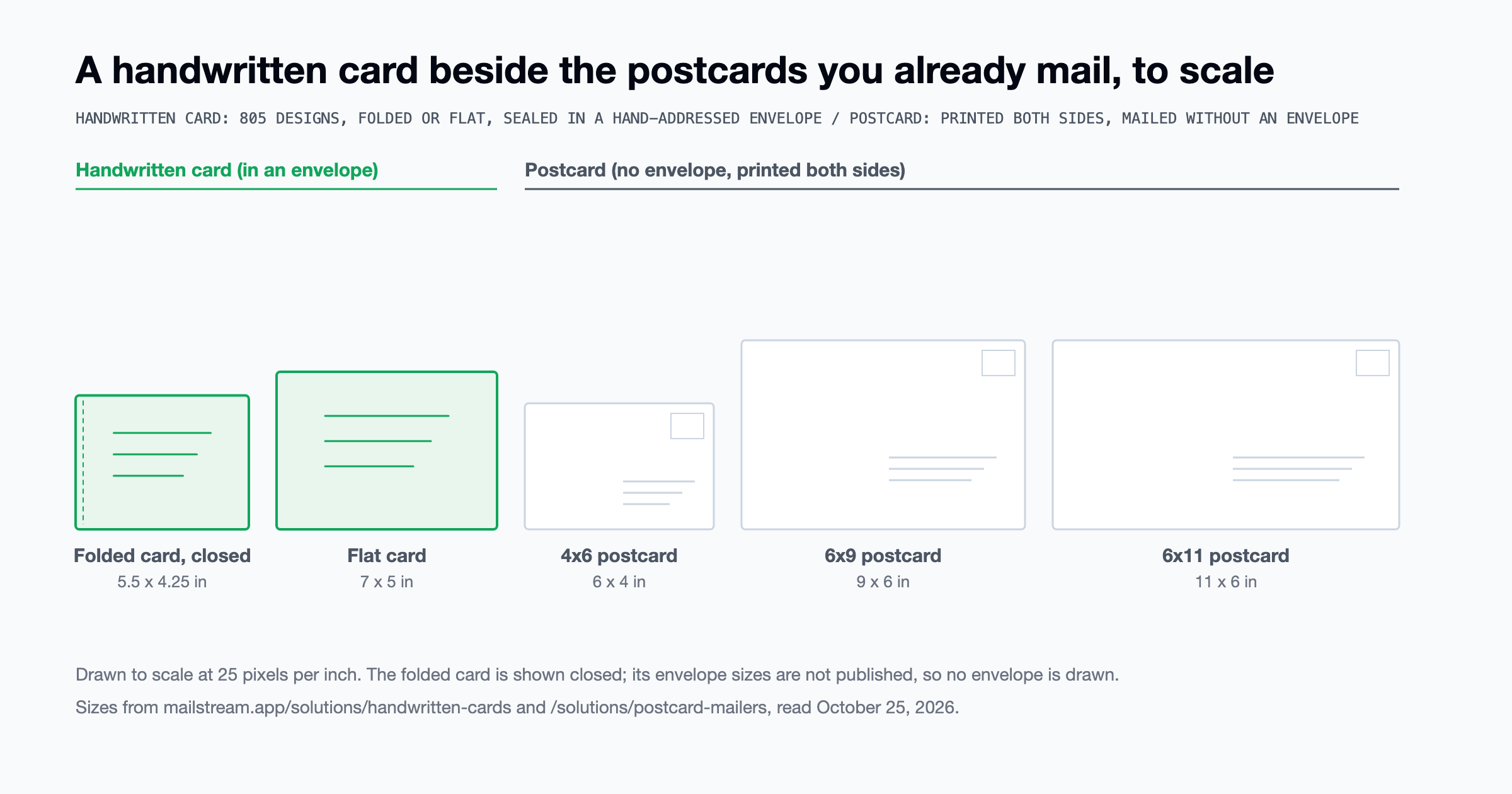
The card comes folded, 5.5 by 4.25 inches when closed, or flat at 7 by 5 inches. It takes a message of up to 500 characters, with each design listing its own limit, and a sign-off of up to 120, in one of 39 handwriting styles, while on a postcard you print your own design on both sides at 4x6, 6x9 or 6x11. The card is mailed in a sealed envelope addressed in the same handwriting as the message, and a postcard has no envelope, so anyone who handles it can read it. If the message is longer than 500 characters and you want it in an envelope, send a letter: MailStream prints it on 8.5x11 sheets from HTML or a PDF and folds it into a white #10 double-window envelope, with your logo and the recipient's address showing through the two windows. USPS sets the class: under DMM 233.2.4, mail containing handwritten material must be mailed as First-Class Mail, Priority Mail or Priority Mail Express. A card and a postcard both take merge fields for the name, and on the card the pen writes the name in, with letter shapes that differ from one card to the next.
If you write the cards yourself you pay for the cards and the envelopes and put a stamp on each, and at retail a stamp is $0.82 for a 1-ounce First-Class letter under the USPS price list effective October 4, 2026; the per-piece figure to set beside that total is the card row on the pricing page. At a few hundred closings a year, or with client birthdays spread across the year, writing the cards by hand is hard to keep up with. With MailStream you type the message once with a merge field for the first name, and the pen writes one card per row of the list. For a roofer or a painter, the postcard list can be a Radius Mailer, which sends a 6x11 postcard to every home around the address you enter and leaves that address out, and the customer at that address gets a card.
Handwritten thank you cards in 500 characters
The Emily Post Institute's guide to thank-you notes says a note runs about four sentences. The first sentence thanks the person for the specific thing, the second adds a thought of your own about it, an optional third looks ahead, and the fourth repeats the thanks or closes. The note starts with a salutation and ends with a closing such as "Sincerely" or "Warmly". On the card those four sentences are the message, and the closing is the sign-off, which the pen writes right-aligned under the message.
A merge field is the part of the message that changes from card to card: {{ first_name }}, any address field, or a custom field of your own. The 500-character limit is counted after the fields fill in. The token {{ first_name }} is 16 characters on your screen, but Jo takes 2 on the card and Christopher takes 11. Line breaks count as characters too. Here is an example message for a painting contractor, with the merge field left in:
Hi {{ first_name }},
Thank you for having us out to repaint the house last week. The color you chose looks right on that porch, and we enjoyed the job. If anything about the finish bothers you over the winter, call me and I will come and look at it myself. If a neighbor asks who did the work, I hope you will pass on our number.
Warm regards, Mike
Before the name fills in, that message is 330 characters and 67 words. With Jo it comes to 316 characters and with Christopher to 325, which leaves 175 characters to spare on the Christopher card. Count the message using the longest first name on your list, and if that one is under the limit the rest are. The sign-off, with its line break, is 18 of the 120 allowed.
When to send a postcard
The 6x9 and 6x11 postcards can go Standard Class, which costs less than First Class. A postcard is also printed from your artwork, as the proof shows it, so a photo of the finished job or a coupon goes on a postcard, while the card's front is one of the catalogue designs. The same customer can get a postcard with the photo and a card with the note. A postcard is handed to USPS within 1 to 2 business days of its send date and carries an Intelligent Mail barcode that shows its printing and its USPS scans in the dashboard; tracking for the card is not documented as of October 2026.
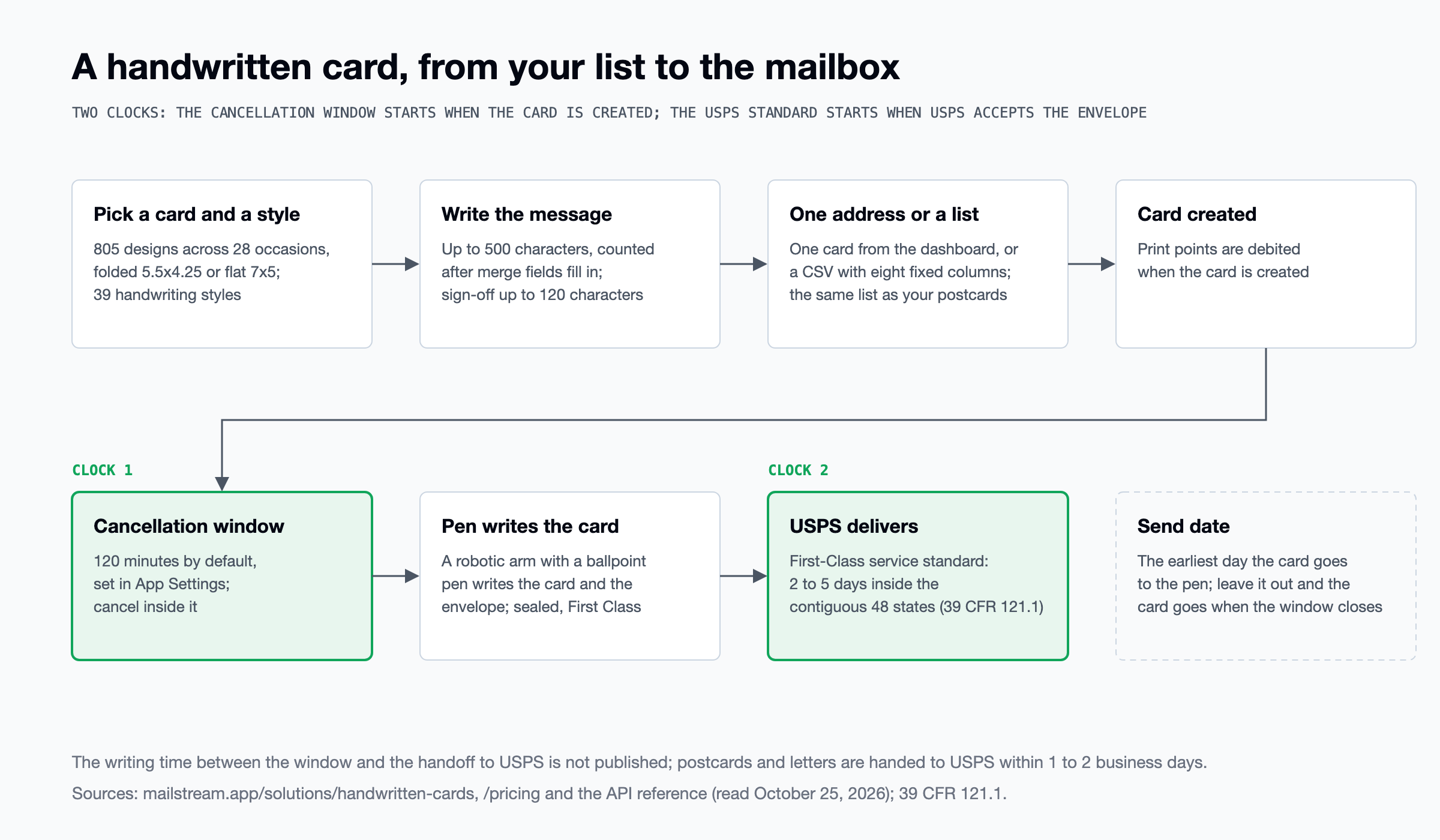
The send date is the earliest day the card is sent for writing, and a card with no send date is sent for writing as soon as the cancellation window closes. That window is 120 minutes after the campaign is created by default, and it can be changed in App Settings. We do not publish how long the writing takes. USPS's standard for First-Class Mail inside the contiguous 48 states is 2 to 5 days from acceptance to delivery, under 39 CFR 121.1. So for a birthday or a closing anniversary, set the send date at least a week before the day.
Sending the first card
Pick a card and a handwriting style in your account; each design shows a preview of its front and its inside. Type the message with {{ first_name }} where the name goes, then add the sign-off and the recipient's address. Send the first one to your own address and check the card and the envelope. Print Points are debited when the card is created, and the card can be cancelled within the 120-minute window.
For the list, upload a CSV with the same eight fixed columns a postcard list uses: first_name, last_name, address_line1, address_line2, address_country, address_state, address_city and address_zip. An extra column headed with a merge tag is stored only if that custom field already exists in the account, and an unknown column is ignored. A card list goes through the same address verification as a postcard list. A church on the Planning Center integration mails its Thank You for Giving postcard when someone joins a List, and it can upload the same donor list as a CSV to send each donor a card. From code, POST /api/v1/handwritten takes card_id, font_label, message, wishes, to_address and send_date, and POST /api/v1/handwritten/bulk takes the CSV's URL and makes one card per row; the API reference has both. An AI agent connected to the MCP server can send a card through the same connection it uses for postcards and letters.