
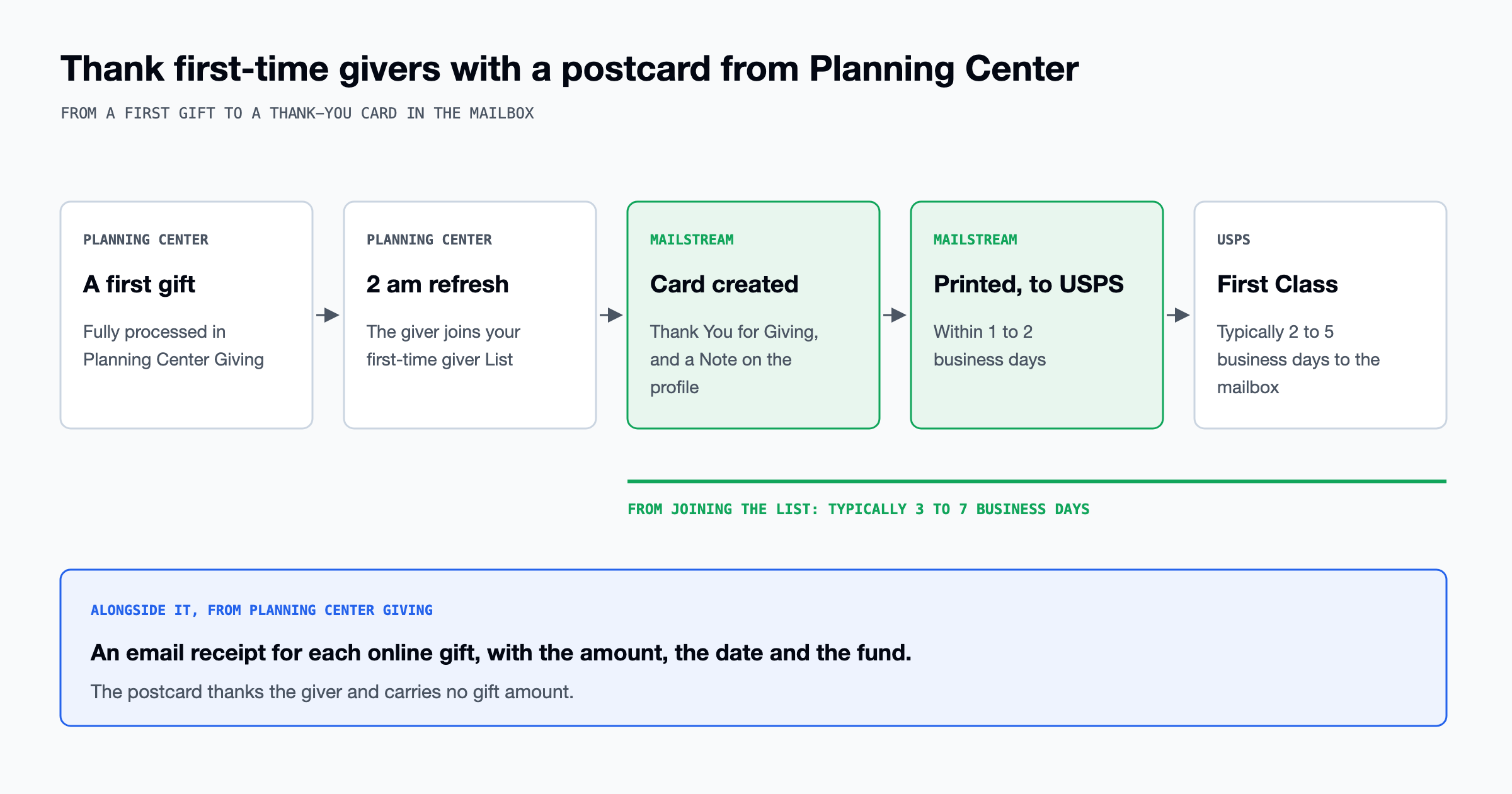
When someone gives to your church for the first time online, Planning Center Giving emails them a receipt, and many churches also follow up with a thank-you of their own. MailStream is a direct mail company that prints and mails postcards and letters, and our Planning Center integration mails a postcard to each person who joins a Planning Center People List you pick. Build a List that finds first-time givers, and each new giver gets our Thank You for Giving postcard, with a Note on their profile that says it was sent. With the List rule below and one test on your own profile, each first-time giver gets a card without anyone on your team addressing or mailing it.
Build a List of first-time givers
In Planning Center People, build the List with this rule, which we tested for first-time givers: Giving, Donors, first donated, any amount, since 7 days ago. Planning Center counts "since 7 days ago" as today plus the previous seven days, so each new giver joins at the first nightly 2 am refresh after their gift is processed. A new List refreshes monthly until you change it, so switch on auto-refresh in the List's Settings tab and set the frequency to Nightly, which runs at 2 am. Giving rules show in the List builder only to a Planning Center Giving administrator, so the person who builds this List needs that permission. A List name such as "Mailstream: First-time giver" tells your team that a postcard is attached to it.
Planning Center's donor Lists count only successful donations, so a giver whose first gift is still in process, has failed or is in an uncommitted batch does not join the List. A gift by check or cash counts once its batch is committed, and the giver joins the List at the next 2 am refresh, when we create the card. By default a List condition includes only the person who gave, and the rule's "include joint donors" box adds the other spouse on a joint gift, so check it only if both should get a card. If a donor is joined with a spouse who has already given, Planning Center leaves that donor off the List when they make a first gift under their own profile, so the automation sends them no card. You can send them the same card from the MailStream app.
Get a mailing address from online givers
Planning Center Giving does not require donors to give an address when they give on Church Center, so a first-time online giver can join your List with an email address and no street address. We need a street, city, state and ZIP on the person's profile. If any of them is missing, we skip that giver and charge nothing, and the send log shows them as "Skipped (no address)." Add a second condition, People, Address, exists, so that only people with an address join the List and its count matches the number of cards that will mail. With that condition, a giver whose address is added while the first gift is still inside the 7-day window joins the List then and gets the card. Planning Center suggests collecting missing addresses with a People form that you send to a List of donors who have none.
What the card says and what the receipt says
Our Thank You for Giving card is one of five ready-made 4x6 church postcards, and it prints each giver's first name from Planning Center. You can open it in our Designer to change the church name and colors, or design your own card in the browser. The integration reads each person's first name, last name, nickname, birthdate and mailing addresses, and nothing from Giving, so the card carries no gift amount. If you would rather send a card written in pen, our handwritten cards include donor thank-you designs, and you send them by uploading a CSV of your donors.
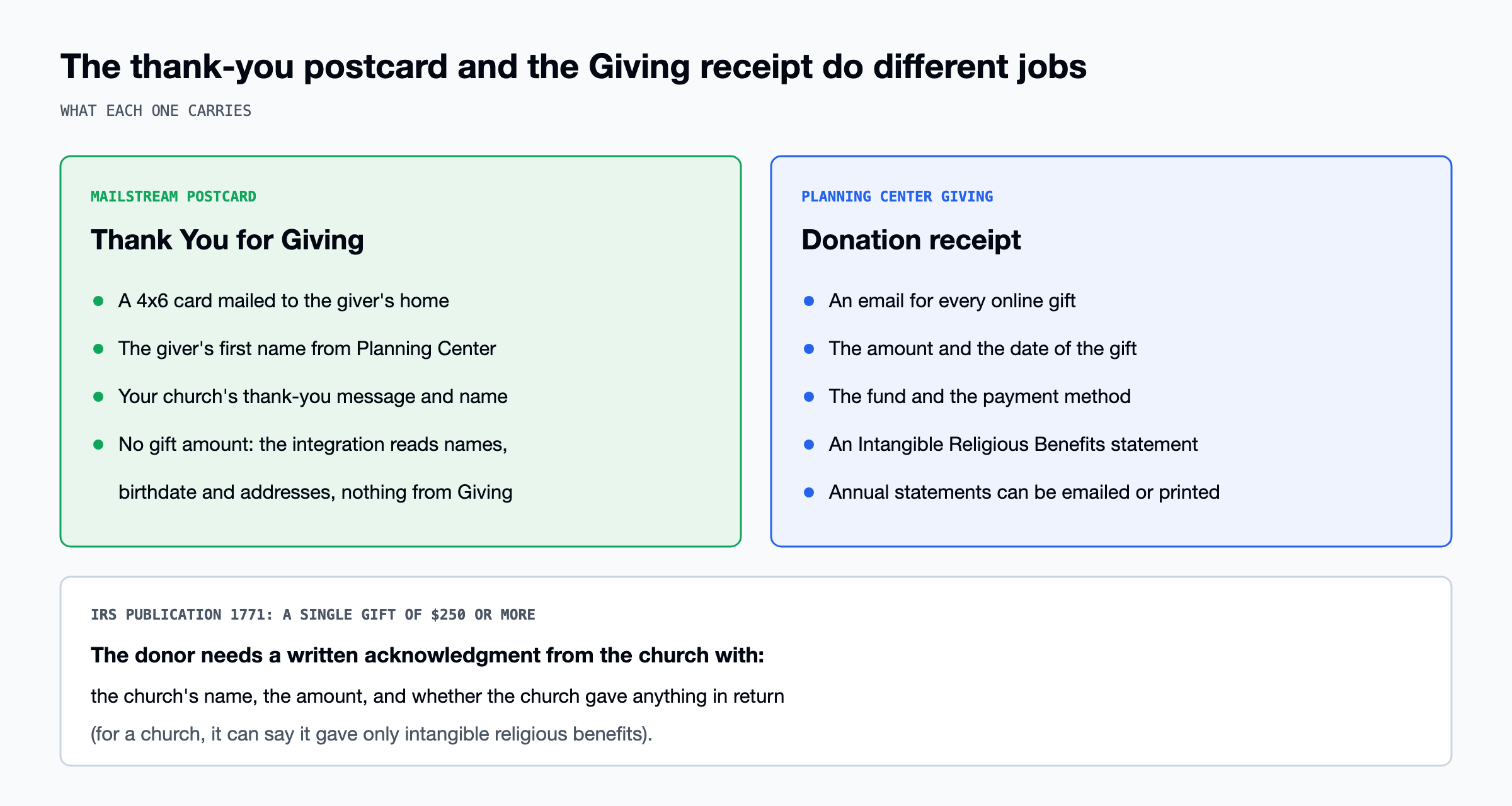
Planning Center Giving emails a receipt for every online gift unless the donor has turned receipts off, and the receipt shows the amount, the date, the fund and an Intangible Religious Benefits statement. Under IRS Publication 1771, a donor cannot deduct a single gift of $250 or more without a written acknowledgment from the church. That acknowledgment has to give the church's name, the amount and a statement of whether the church gave anything in return, and a church that gave only intangible religious benefits says so. The IRS accepts a letter, a postcard, a computer-generated form or an email with that information, and our Thank You for Giving postcard, which carries no amount, does not have it. A first-time giver who gave by check and has no email address on file gets no emailed receipt, and Giving can print their statement for you to mail.
Set up the automation
To connect Planning Center you need to be a MailStream admin and an administrator or manager in Planning Center People, and our setup guide walks through the connection. In the automation, pick the List and the card, and leave Postage on First Class (Standard Class is not offered on 4x6). Then set the cooldown, which is the number of days, from 1 to 365, before the same person can get the same card again. Our recipe uses 365 days for a first-time giver, so that a giver whose donor record is merged, or who is still on the List when it is rebuilt, does not get a second card. Only people who join the List after you create the automation get a card, so to thank the givers who were already on it, send them the card from the MailStream app.
Right after the 2 am refresh adds a giver, we create the card, take its Print Points from your prepaid balance and write the Note on their Planning Center profile. The integration is included on every MailStream plan, including Free, and an automated card costs the same as a card sent from the app or the API. If your balance is too low, we skip the card and charge nothing, and the send log shows "Skipped (insufficient print points)." We print the card and hand it to USPS within 1 to 2 business days, and First Class delivery typically takes 2 to 5 business days after that. Every postcard carries a USPS Intelligent Mail barcode, so USPS's scans of each card show in the campaign's tracking.
Test it on yourself
Start the test with an empty List, then join it yourself:
- Create a List whose one condition is an email address nobody uses.
- Set a test automation to use that List and your card.
- Change the condition to your own email address and refresh the List.
Usually within a few minutes, our send log shows your name as Sent with a link to the card, and your profile's Notes tab shows a Note such as "Mailstream sent the 'Test' postcard (4x6, First Class)." The test mails one real card to you and uses Print Points for one postcard. When it works, pause or delete the test automation. The Planning Center page has this recipe and the ones for birthdays and first-time visitors.